
Guideit Showing Blank or Missing Settings
You may see an issue where the GuideIt extension appears blank, unresponsive or elements especially in the brand assets seem to not be loading.
This can look like:

- Inputs cannot be selected
- All colours appear filled (black)
- Fonts, colours, and settings are missing after reopening Illustrator
- Settings appear correctly in the generated document, but cannot be edited in the extension
This is usually caused by a session or license issue.
How to resolve this
Step 1: Deactivate and reactivate your license
- Open GuideIt
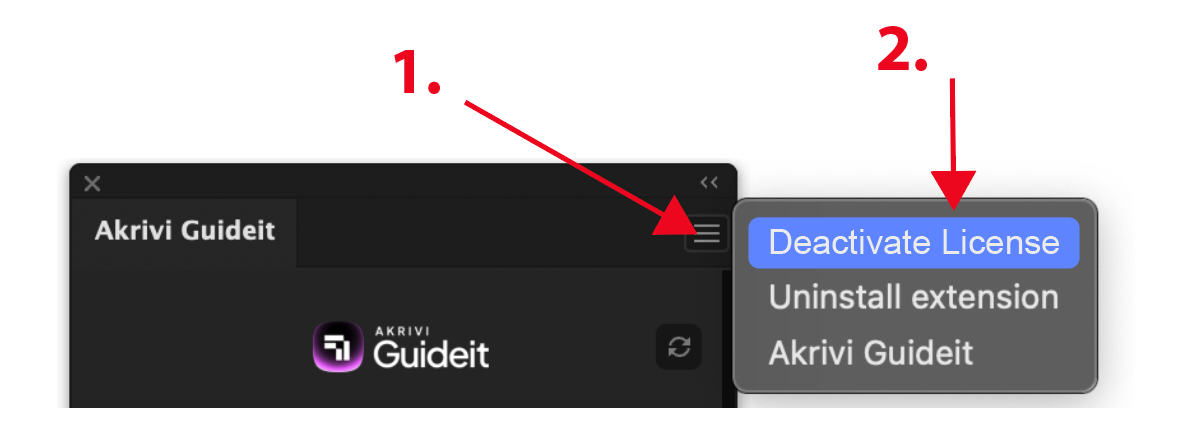
- Click the menu (3 dots) in the top right corner
-
Click Deactivate License (this will log you out)
- Re-enter your license key to activate again
👉 You can retrieve your license key using this guide
Step 2: Uninstall and reinstall the extension
If the issue continues:
- First, complete Step 1 (deactivate your license)
- Uninstall the extension
- Reinstall the extension
👉 Follow this guide to uninstall and reinstall
Important to know
- This is not caused by your design file
- Your generated outputs (e.g. brand guidelines) are not affected
- Restarting Illustrator alone may not fix the issue
- Reactivating your license usually resolves it