
Create a Lockup Grid | Logo Grids
A lockup grid draws the spacing relationships between the parts of your lockup — horizontal, vertical, condensed, or with a partner logo.
Video tutorial
Step 1
- Open the Lockup tab in Logo Grids, and select your logo with the Selection tool
-
Step 2
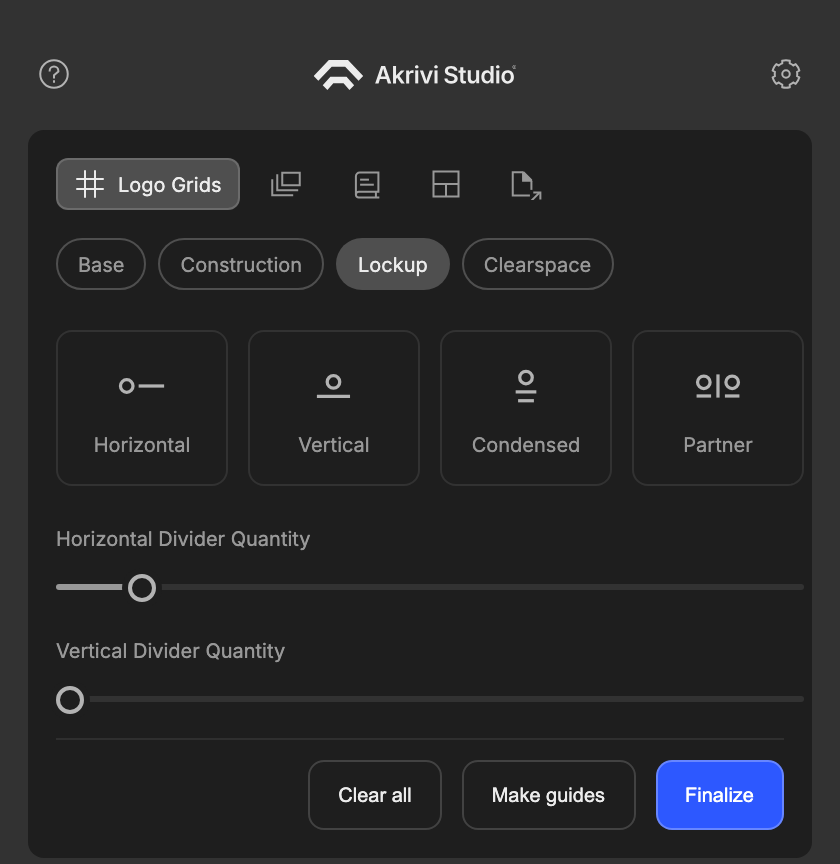
- Pick a lockup style — Horizontal, Vertical, Condensed, or Partner. The grid draws the spacing relationships between the parts of your lockup

Step 3
- If you'd like more or fewer divider lines, use the Horizontal Divider Quantity and Vertical Divider Quantity sliders

Step 4
- When you're happy, click Finalize to flatten your grid — ready to present, and free to create more

You can also click Make guides to turn your grid into real Illustrator guides, or Clear all to erase the grid and start again.